Parameters and formulas
Every numeric field in the program takes an expression, not just a number: 40/2, w*2,
len+5, sin(30)*10, pi*d.
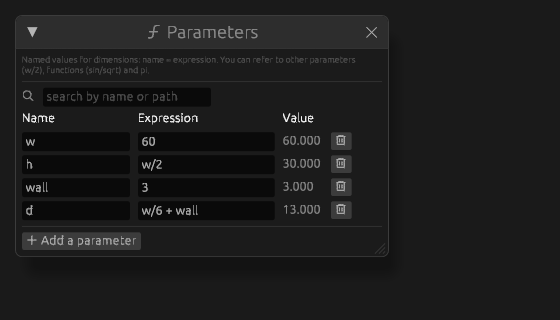
h is computed from w, and d from w and wall. Change one number and all of them follow.
Global parameters
Press ƒx Parameters in the bar above — the window of the document's parameters opens: a name, an expression, a
value. Add a parameter makes a row; a name is letters, digits and "_", not starting with a digit. The names pi,
tau and e belong to the constants a formula knows, so a parameter cannot take them; Pi or e1 will do. A
parameter can refer to another one: d = w/2.
That name then works in any field: in a sketch dimension, in an extrusion height, in a fillet radius, in an array spacing, in a joint angle. A field offers to finish a name you are typing from a list — Enter takes it.
What it is for
One number the whole part depends on must live in one place. Sheet thickness, fastener pitch, shaft diameter — if they are retyped into twenty fields, one day you will fix nineteen of them.
A practical habit: create the parameters before drawing and type their names straight away. That is cheaper than coming back and replacing numbers later.
Named sketch dimensions
A sketch dimension can be named and then becomes available as a parameter. That is how a skeleton is built: the main sketch sets the overall sizes, and the parts take their dimensions from its named ones.
If it did not work
- A formula does not count — its row has no value, and below the table it says what is wrong: an unknown name, an
extra bracket. Circular references (
a = b + 1,b = a + 1) do not count either, and the table says so. - A name is not taken — it is already in use or cannot stand in a formula; the table says why.
- A parameter deleted with the bin button in its row while something used it — those operations turn red with the reason "unknown name: … — there is no such parameter", and the body stays as it was. Ctrl+Z brings the parameter back.
See also
- Sketch dimensions — where named dimensions come from.
- Documents and templates — how to carry a set of parameters into a new project.