Documents, templates and keeping your work safe
Getting started
On the first start the Cube sample opens — a part with a sketch and an extrusion: a double-click on it in the tree shows how it is built. After that the program opens with the start screen: New part, New assembly, Open… and the recent files. New part makes a document with a part and takes you into it. New assembly and File -> New project make an empty assembly: a part is added to it with the New part button (key N).
Saving and opening
File -> Save (Ctrl+S), Save as…, Open project…. The file keeps both the building steps and the finished geometry: a large project opens at once, with no recomputing. If the document has unsaved edits, the program asks whether to save them before opening another one or making a new one.
Document properties
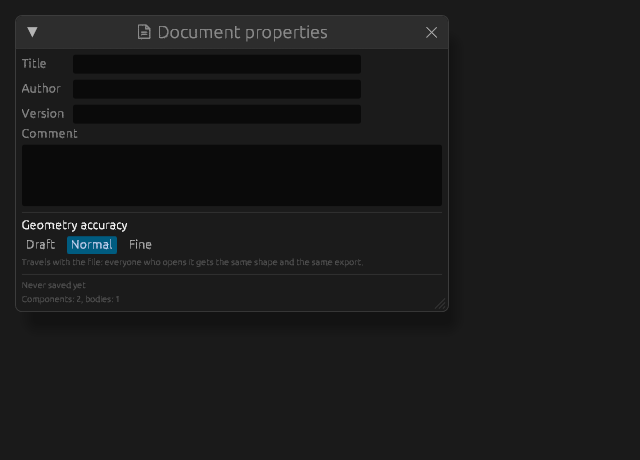
File -> Document properties…: the name, author, version, comment and geometry precision travel with the file — whoever opens it sees whose it is and with what precision to compute. The creation date is set once, on the first save.
Templates
File -> Save as a template turns the current document into a blank: properties, precision, datums, prepared sketches. File -> New from a template makes a new document from it. The new document does not remember the template's path: the first "Save" asks where to put it, and the template is left untouched.
Autosave
Every so often the program quietly writes a copy next to the project; an ordinary "Save" deletes it. If on opening the copy turns out newer than the file — the previous work broke off after edits — the status line says where the copy is: open it with File -> Open. The interval is set in the settings (Autosave every); zero turns it off.
Recent files
File -> Recent and the start screen. Paths that are no longer on the disk are dropped from the list; Clear the list removes them all.
Undo
Ctrl+Z and Ctrl+Y (or Ctrl+Shift+Z), with the step's name in the Edit menu. The depth of the history is Undo steps in the settings: more steps means more memory, a snapshot of a large assembly weighs tens of megabytes.