Keyboard shortcuts
The full list is “Help -> Keyboard shortcuts”. Keys are reassigned there too.
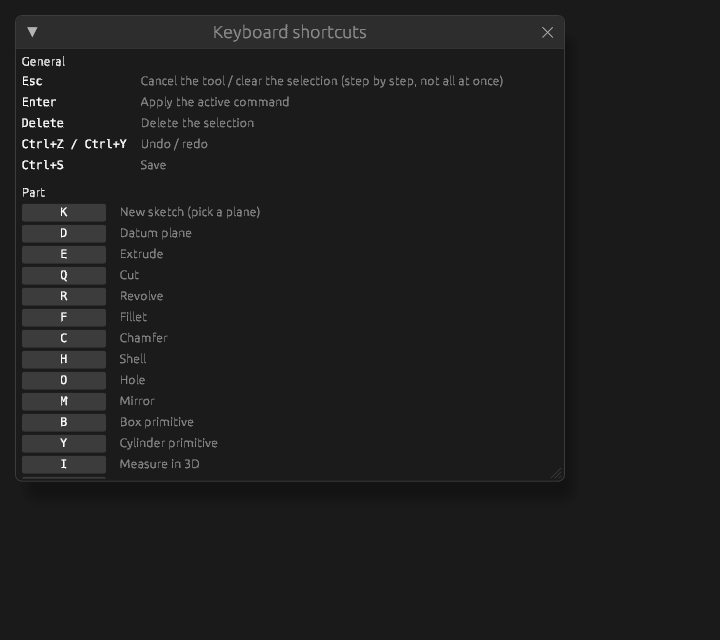
General
Esc cancels a command, Enter applies, Ctrl+Enter finishes the sketch, part or subassembly,
Delete removes the selection, F2 renames the selection in the tree, Ctrl+Z and Ctrl+Y undo and
redo, Ctrl+S saves.
These cannot be reassigned: they, and every Ctrl combination, belong to the system.
Ctrl+Enter goes one level up: out of a sketch into the part, out of a part into the assembly, out of a
subassembly into the assembly holding it. The same as the Finish button at the top, without taking your
hands off the keyboard. While a command or an array is open it leaves them alone — there Enter applies,
and you leave afterwards.
F2 opens the name right in the tree row — a part, a subassembly, a sketch, a feature, a body or a
datum. Enter confirms the name, Esc cancels. With nothing selected, F2 does nothing.
Per workbench
Workbench keys are a single letter without modifiers, because the other hand is on the mouse. The
same letter means different things in different workbenches: C is a circle in Sketch and a chamfer
in Part. There is no confusion: only one workbench is active at a time.
Part: E extrude, Q cut, R revolve, F fillet, C chamfer, H shell, O hole, M mirror,
B box, Y cylinder, D datum plane, K sketch on a face, I measure, U reselect the
outline.
Sketch: L line, R rectangle, C circle, A arc, P point, G polygon, O slot, E ellipse,
N spline, T text, D dimension, F corner fillet, K trim, M mirror, X construction, S
select.
Assembly: I insert, N new part, U sub-assembly, J joint, D datum plane.
When the cursor is in a text field
While the cursor is in a field — the extrusion depth, a name, the search box — a letter is typed:
fields take expressions like w*2.
To call a tool straight from a field, hold Alt: Alt+U instead of U.
| Where the cursor is | How to call a tool |
|---|---|
| in the scene, in the tree, anywhere outside a field | the bare letter: U |
| in a text field | Alt + the letter: Alt+U |
There is no need to click away to free the keyboard.
Ctrl+K opens the command search always, including from a field. Space does the same, but only
while the cursor is outside a field — inside one it types a space.
Reassigning
In the reference window click the key of an action, then press the one you want. If it is already taken in the same workbench, the program says which command has it and asks what to do — see below.
Reassignments are kept in the settings and travel with the profile. reset next to a key returns its default; Reset every key to the default returns them all.
Instead of a single key you can press a combination with Ctrl or Shift: a letter, a digit or F3–F12 —
W, Shift+W, Ctrl+Shift+F5. Alt cannot be part of a key: it is what reaches the keys from a text field.
A Ctrl combination types nothing, so it works from a text field as it is. On a Mac Ctrl here means Cmd,
Alt means Option, and the window writes the keys the Mac way, with the symbols of these keys. A Mac also
takes combinations with its own Control key, Control+J or Control+Cmd+J; they work only on a Mac, and on
another system the window shows such a key crossed out. Esc while the window waits leaves the key as it was,
Backspace leaves the action without a key.
Some combinations cannot be taken. Ctrl with A, C, K, S, V, X, Y or Z — with or without
Shift — belongs to every workbench at once: selection, the clipboard, the search, saving, undo. A bare X
toggles construction geometry. The rest depends on the system. On Linux and Windows Ctrl+H, Ctrl+U and
Ctrl+W erase text in a field. On a Mac those are free, but Cmd+H hides the program, Cmd+Q quits it,
macOS takes Shift+Cmd+Q, Control+Cmd+Q, Shift+Cmd+3, Shift+Cmd+4, Shift+Cmd+5 and
Control+F3–Control+F8, and in a field Control+H, Control+K, Control+U, Control+W erase text while
Control+A, Control+E, Control+B, Control+F, Control+P, Control+N move the cursor. Hover over a
crossed-out key to see why.
When the key is taken, the window offers Swap (that command gets the key you are replacing), Take
it (that command is left without a key) or Keep as it was. The filter above the table finds a command
by a word of its description or by its key. In an interface in another language it also finds a command by
its English name: mirror finds Mirror. The command search (Ctrl+K) finds the same way.