The history timeline and rollback
Every operation is a node of the timeline. A model is not a picture but a recipe: the program walks the timeline top down and builds the result again.
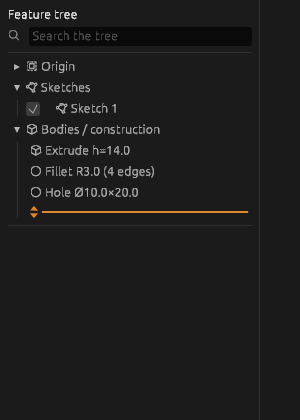
Everything else follows from that
- Go back to any step, change a number, and it rebuilds along with everything below.
- An edit to a sketch at the bottom of the timeline reaches the very last feature.
- A broken step is visible on its own line, not “somewhere in the model”.
Rollback
The rollback bar temporarily stops the build at a chosen step: nothing below is built. That is how you look at what the body was halfway through, and how a new operation is inserted into the middle. Drag the bar up or down, or pick Roll back to here from the right-button menu of a row; Clear the rollback in the same menu builds the whole timeline again.
Suppression
A suppressed feature is skipped but stays in the timeline: the right button on the row -> Suppress, and Enable to bring it back. A modifier does not break the chain that way: suppress a fillet and the features below build on the body as it was before it. That is handy for variants and for finding the culprit when something fails.
When a feature fails
Its row turns red and the reason is said in words: “the source body was not built”, “the cutting plane was deleted”, “the radius is too large for these edges”. Fix the named reason instead of rebuilding everything.
When a feature turns yellow: found by position
A feature holds its faces and edges by name. When a change above leaves a name nowhere, the feature looks for the face or edge standing exactly where it stood. Then its row turns yellow, and its properties say “a reference of this step was found by its position, not by its name”. Look at the result: if the right face or edge is taken, press Accept in the properties and the mark goes; if not, open the feature with a double-click and pick it again. The mark stays in the file until one or the other is done. Changed your mind after Accept — Ctrl+Z brings the mark back.
When a fillet or chamfer turns yellow: built a hair short
A fillet or chamfer whose size eats a face whole — a radius as high as the step it rounds — is built exactly where its edges are straight between flat faces. Elsewhere it is built a hair short of the size, by no more than 0.001%, and its row turns yellow with the words “built a hair short of its size”. The part is usable as it is. If the exact size matters, make it slightly smaller or larger than the face it eats, and the mark goes.
Deleting a line
Select the line and press Delete. The window shows what is built on it. Only the line itself goes: what is built on it stays in the timeline, red, with the reason “what it was built on is deleted”, to be repaired or deleted. To remove it all at once, tick “Delete what is built on it too”. Changed your mind — Ctrl+Z brings everything back.
See also
- The model tree — where that timeline lives.
- Parameters and formulas — what to change so everything rebuilds at once.