The build tree
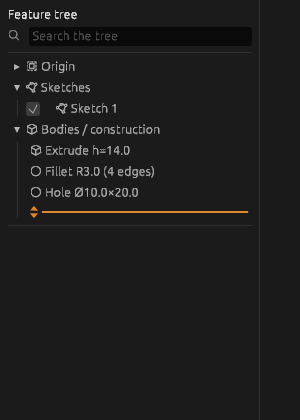
The tree on the left is the document. Everything is in it: parts and subassemblies, sketches, datums, bodies and the timeline — each operation on a row of its own, in the order it is carried out.
What you can do in the tree
- Select — a click; the selection shows in the properties on the right.
- Step into a part or a subassembly — a double-click.
- Open an operation for editing — a double-click on its timeline row: the same tool opens with the same fields, Enter applies the edit, Esc leaves things as they were.
- Hide — the tick box of a row: the body or the sketch goes out without being deleted.
- Right button on an operation: Rename, Edit, Up / Down, Suppress (the operation is skipped, the timeline goes on from the body as it was before it), Roll back to here, Delete. On a sketch also Move it to another plane, Copy, Cut and export to SVG or DXF.
- Copy an operation: select its row, Ctrl+C, then Ctrl+V — its tool opens with the same values, a click places the copy, Enter applies it.
The bodies of a part
Inside a part, above the Construction timeline, stands the list Bodies (N) — a row for every body the part shows. Usually there is one; the pieces of Split body and of a cut that goes right through the part are rows of their own. A click on a row picks the body and lights it on the canvas, the tick hides it, the right button offers Rename and Make a part: a name is asked beside the cursor, Enter moves the body into a part of its own.
Deleting
Del or Delete in the menu. To delete several rows at once, pick them first: Shift and a click pick every row from the one picked before, Ctrl (on a Mac Cmd) and a click add a row or take it away. The program asks and says how much is built on what you delete. By default only the row itself goes: whatever stood on it stays in the timeline in red with the reason — to be repaired or deleted. The tick box Delete what is built on it too removes it all at once. A mistake — Ctrl+Z: one press brings back everything deleted together.
Search
The Search the tree field above the tree keeps the rows whose names contain what you typed. On a part of fifty operations this is faster than looking.
Order is not decoration
The order of the timeline rows is the order of building: a fillet before a cut and the same fillet after it are different shapes. Up and Down move a row; if the move would tear an operation off what it stands on, the button is grey.
The orange rollback line at the bottom of the timeline shows how far the timeline is built. Drag it up — the model becomes what it was at that step; new operations go in at the line. Clear the rollback takes the line back down.
If it did not work
- A row is red — the operation has an error; the reason shows on hovering and in the properties. Open it with a double-click and fix the values or what it stands on.
- Up / Down are grey — the move would break a dependency. Move what the operation stands on first.